
SAP API management
API Management maps the entire lifecycle of an API. This includes:
- Building APIs, including configuration, publishing and built-in testing
- Publishing Products. Products are bundles of APIs that are related to each other
- Analyzing APIs, including message tracing and monitoring inbound and outbound traffic
- Also Consuming, Monetizing, Discovering and Designing APIs
Components
- API Provider which summarizes several different sources from the cloud, SAP- and non-SAP backends, the internet, an so forth
- API Proxy that provides the API as a service, using a new and unified URL schema
- API Designer to document the specification in an OpenAPI format
- API Policies allow developers to intercept and change the request and responses
- API Product which summarizes several belonging API endpoints
- API Monitor used to test and monitor API endpoints
- API Business Hub to publish products and entries
API Provider
API Providers define connection details for services. This includes details about the host where they are running and details necessary to establish a connection, for example credential or authentication details.
API providers can connect to a variety of sources, including third-party APIs, SAP Backends using the Cloud Connector, and so on.
Info
- API Providers are created under
Configure->APIs->API Providers- The relevant path prefix for SAP Systems is usually
/sap/opu/odata/- The catalogue endpoint can be found under
/IWFND/CATALOGSERVICE;v=2
SAP backend systems can easily be connected by using a communication user and basic auth.
API Proxy
API Proxies (or just APIs) is the actual API Service. It acts as a middleman between the API Consumer and the resource API Provider and exposes endpoints for its consumption.
Info
- API Proxies are created under
Configure->API->API Proxies- They expose API Providers to API Consumers in form of URLs
- API Proxies can discover OData services automatically and expose only selected endpoints
It is good practice to version API Proxies to adhere to the Clean Core Principles.
Policies
Policies extend the behavior of APIs by intercepting & modifying requests and responses. This includes, but is not restricted to:
- Secure API access
- Control traffic flow
- Transform message formats
This is done by using custom scripts and attaching them to the API Proxy. There are plenty of Policy Types that can be downloaded and used from the SAP Business Hub
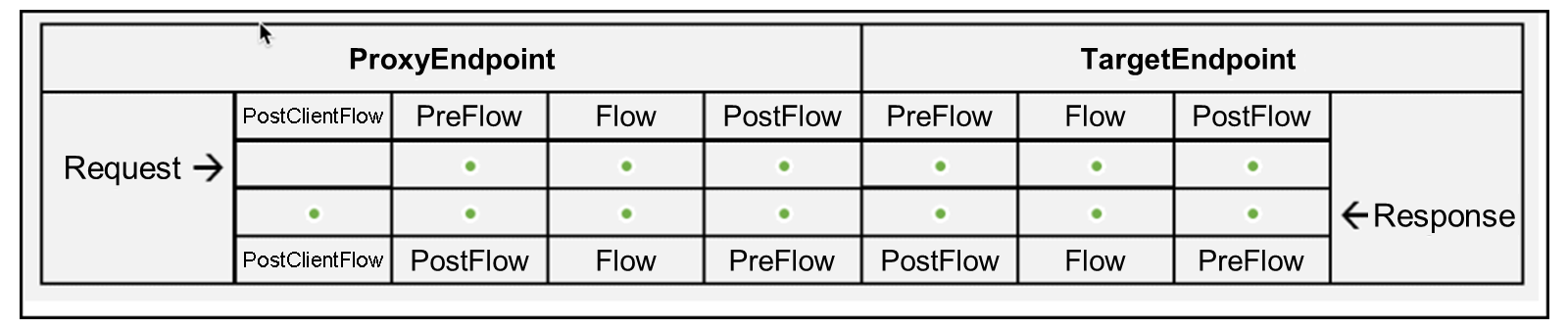
In the following image, you can see in which step of the request-response lifecycle policies can be applied.
Info
- Policies are configured on an API Proxy base :
Configure->API->API Proxies->Select Proxy->Policies- Policy templates can be stored under
Configure->API->Policy Templates
In order to add policies to API Proxies, you must first choose the step in which the policy should take place. For example Flows->TargetEndpoint->PostFlow. Then select and apply a policy from the list on the right side.
API Monitor
APIs generate key metrics as they are used. An application in the integration suite allows users to monitor these, as well as health indicators and message traces.
Info
- API Monitor is available under
Monitor->APIs
Monitoring can also be handled in the cALM Health monitor. This feature must be activated in Cloud ALM itself.
Logging can be handled by third-party providers as per this service documentation